All articles
Mobile17 June 20266 min read

Native app or PWA? A 2026 decision guide for Australian businesses

Mobile decisions get expensive fast. Here is the QuantamQ decision tree we use with clients before we write a single line of mobile code.

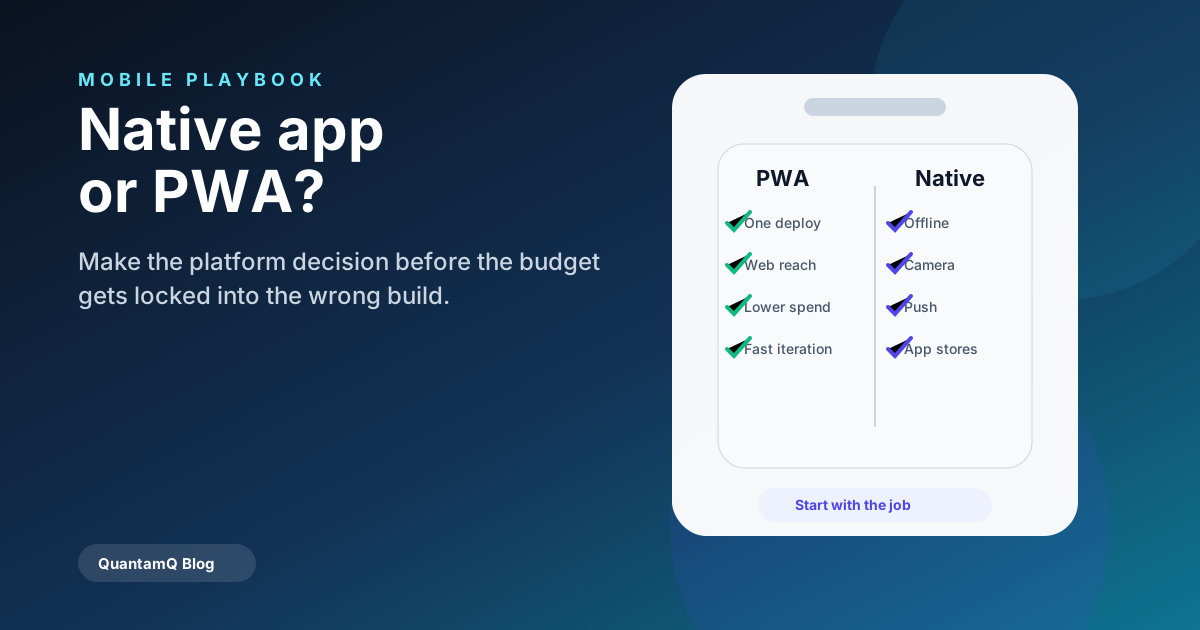
Native app versus PWA decision board for Australian business mobile projects.

Start with the job, not the platform

The right answer almost always falls out of the job-to-be-done. Field staff who need offline data and a camera have very different needs to a marketing team that wants a mobile-optimised booking flow.

We start every mobile engagement with the same question: what does this app do that a great mobile website cannot?

When a PWA is the right answer

Choose a Progressive Web App when most of the following are true:

  • The app is mostly read-and-fill workflows — booking, dashboards, simple data entry.
  • You do not need deep hardware integration (LiDAR, Bluetooth peripherals, background audio).
  • App-store presence is a marketing nice-to-have rather than a distribution requirement.
  • You want one codebase, one deploy, one bug surface.

When native (or React Native) is worth the cost

Go native when you need the camera and barcode scanning to be fast, offline data to be robust, push notifications to be reliable, or when app-store presence is itself the customer trust signal.

For nearly all Australian SMB cases that need native, React Native or Flutter is the right choice — one team, two stores, lower long-term cost than two separate native codebases.

Frequently asked questions

How much does a cross-platform mobile app cost in Australia?

A focused first version (one or two core flows, basic auth, one backend integration) typically lands between A$25,000 and A$75,000 in 2026. The cost driver is integrations and offline behaviour, not screens.

Can we ship a PWA first and go native later?

Yes, and it is often the smartest path. A PWA proves the workflow with real users, captures analytics, and clarifies what the native version actually needs to do — before the more expensive build.
Share
Start a project brief

More from the blog

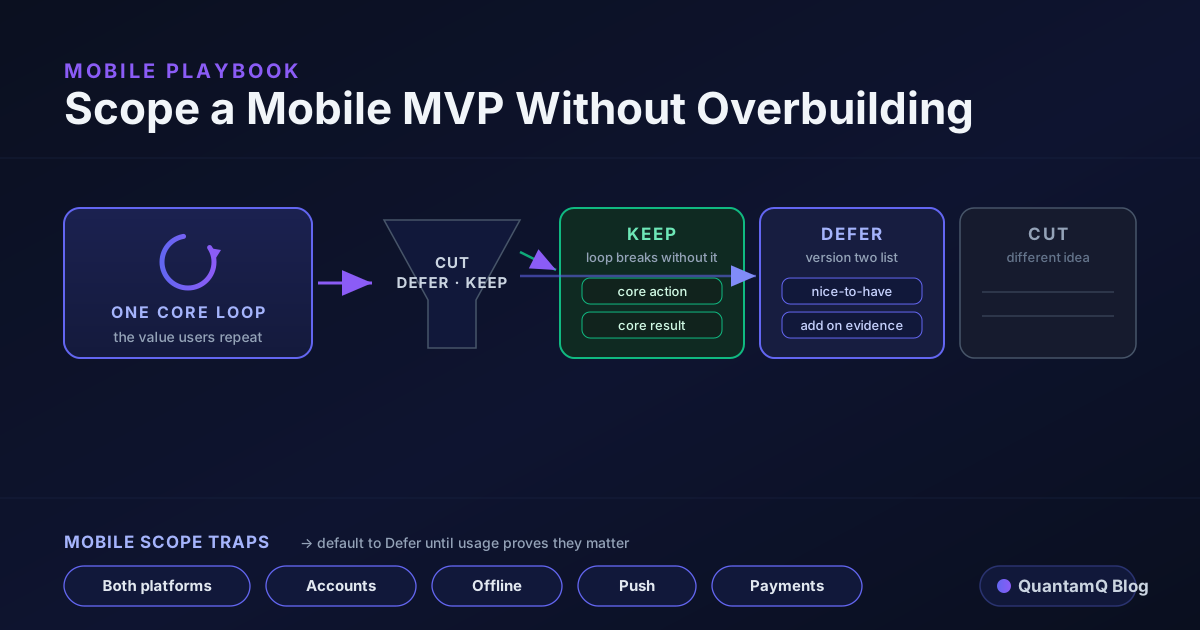
How to Scope a Mobile MVP Without Overbuilding
Mobile MVP scoping diagram showing one core loop in the centre, a cut-defer-keep filter sorting features into three columns, and a row of mobile scope traps — both platforms, accounts, offline, push, payments — being deferred.
Mobile8 min

How to Scope a Mobile MVP Without Overbuilding

Most mobile MVPs fail on scope, not code. Founders add accounts, offline mode, push, payments, and both platforms before they have proof anyone wants the core thing. Here is how to scope a mobile MVP around one core loop, a cut-defer-keep test for every feature, and the mobile-specific traps that quietly expand a build.

Read article
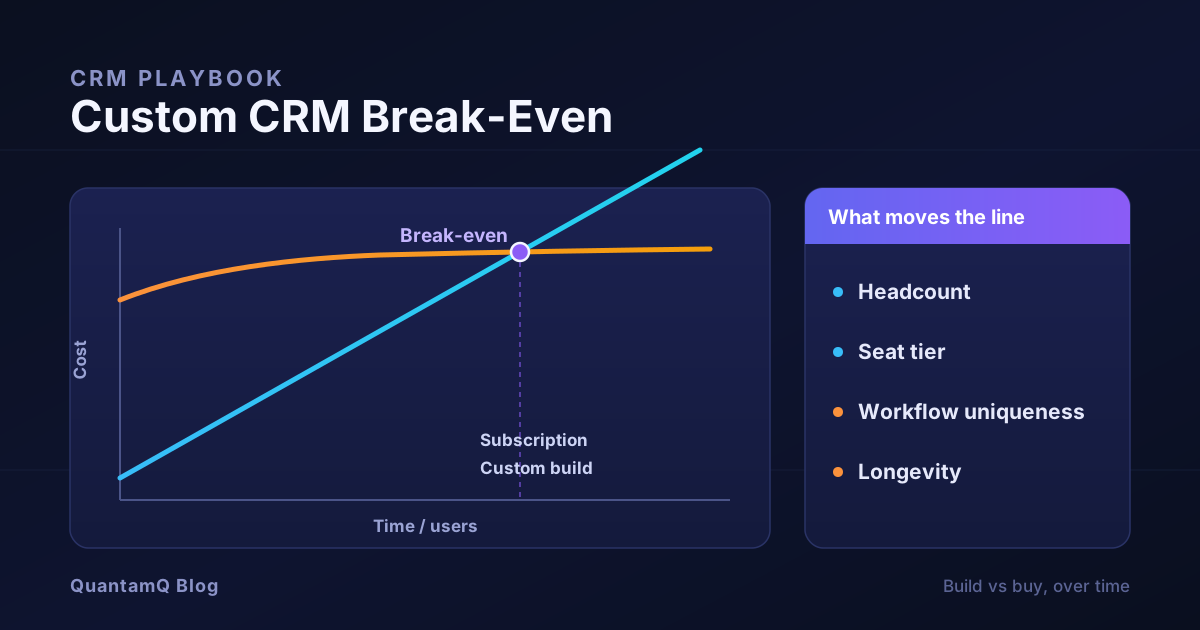
Custom CRM Break-Even: When Building Actually Pays Off
Break-even chart comparing two CRM cost curves over time: a subscription line that rises steadily with users against a custom build line that starts high then flattens to a low maintenance slope, with a marked crossover point and a decision panel listing the variables that move it.
CRM and Operations8 min

Custom CRM Break-Even: When Building Actually Pays Off

Most build-versus-buy CRM advice ends in a feature table. This one gives you the payback maths instead: the two cost curves to compare, a simple way to find your break-even point, the variables that move the line, and the costs the quick calculation always misses — so you can decide whether a custom CRM actually pays off for your team.

Read article
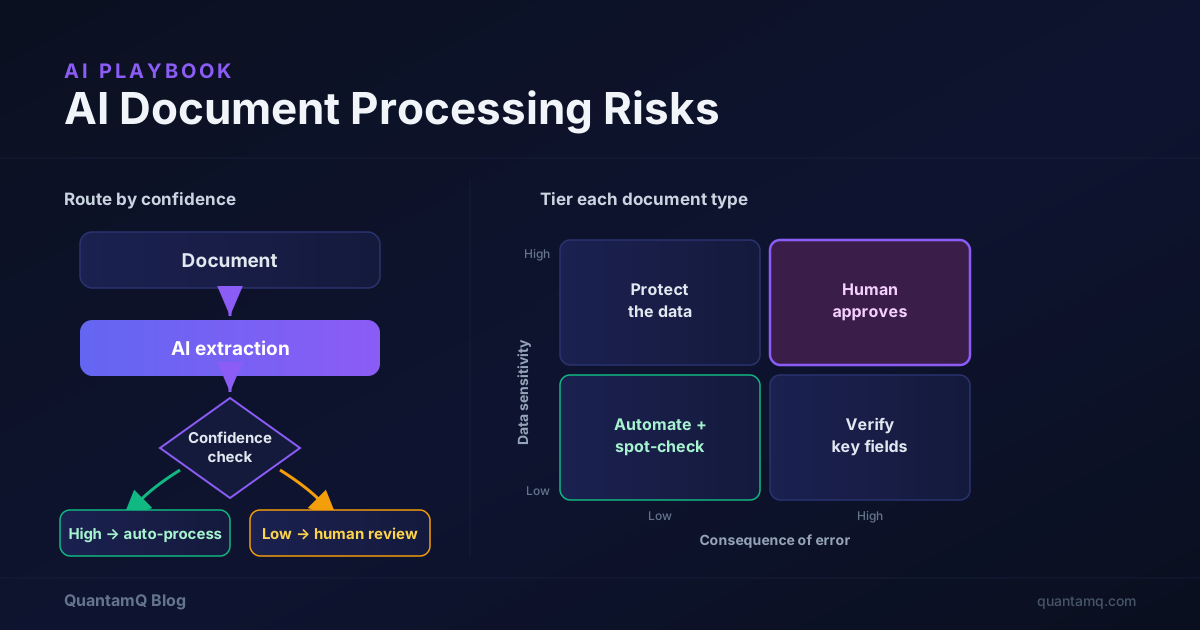
AI Document Processing Risks: What Small Teams Must Control
AI document processing risk diagram: a document flows through AI extraction to a confidence check that routes high-confidence results straight through and low-confidence or sensitive results to human review, beside a two-by-two risk tier matrix of data sensitivity against consequence of error.
AI and Automation8 min

AI Document Processing Risks: What Small Teams Must Control

AI can read invoices, contracts, and forms faster than any person — and get them confidently wrong. This is a practical guide to the AI document processing risks that often create problems for small teams, with a way to tier your documents by sensitivity and consequence of error, decide where a human stays in the loop, and roll it out without quietly creating a data or compliance problem.

Read article