Three workloads, three different answers
Almost every web brief lands in one of three buckets, and each one rewards a different stack.
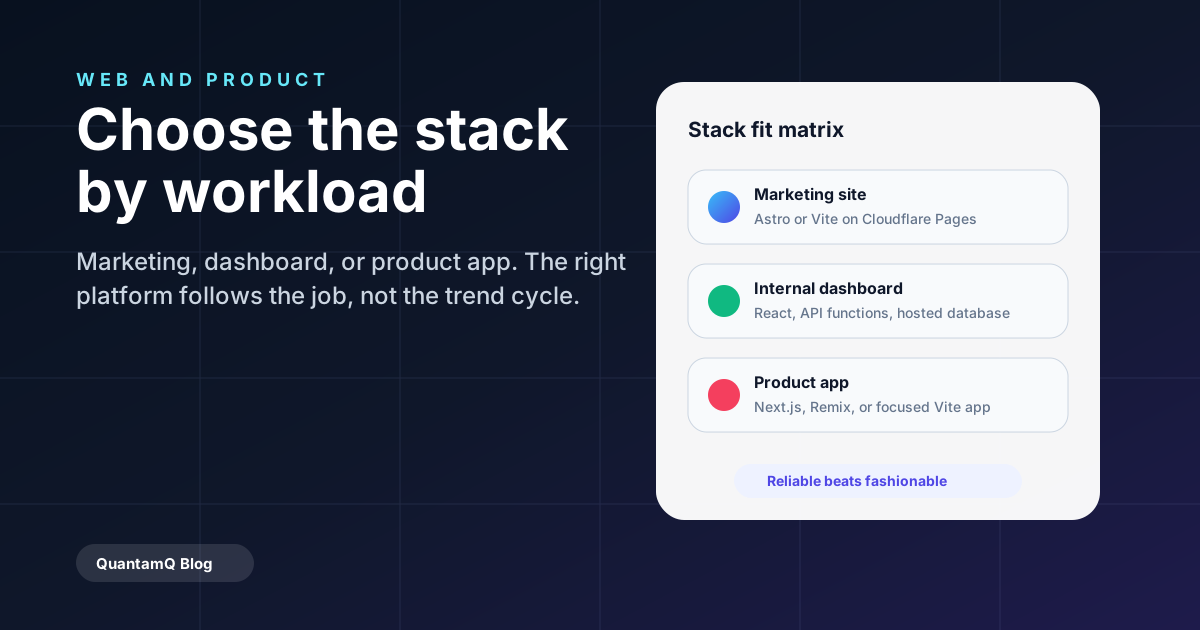
- Marketing or brochure sites — Astro or Vite + React on Cloudflare Pages. Static, fast, cheap to host, easy to hand back to a marketing team.
- Internal dashboards and portals — React + a hosted backend (Supabase, Hasura, or a small Node API) on Cloudflare Pages or Vercel. Optimise for shipping features over pixel polish.
- Customer-facing product apps — Next.js or Remix if SEO matters; React + Vite if it does not. Choose the platform that matches your team, not the trend cycle.
Why we lean on Cloudflare Pages for most builds
Cloudflare Pages combines static hosting, edge functions, automatic preview environments per pull request, and a generous free tier. For most small business sites it eliminates an entire hosting bill and most of an ops conversation.
If you are choosing specifically between Cloudflare Pages and Vercel, the factors that actually decide it for a business are usually the free-tier commercial-use rules and how the bill behaves as traffic grows — not raw edge performance — so it is worth comparing those deliberately before you commit.
For dynamic logic — contact forms, API proxies, AI calls — Pages Functions handle the work without needing a separate backend service. That is exactly how this site is built.
What to avoid
Avoid stacks that lock you into a single vendor for hosting plus storage plus auth plus payments. If the bill jumps 5x in year two, you should be able to move.
Avoid CSS frameworks the team will not maintain. Tailwind, vanilla CSS, and a sane design system beat a long tail of bespoke components nobody owns.
Frequently asked questions
Is Next.js still the right default in 2026?
Often, but not always. Next.js is excellent for product apps where SEO and server rendering matter. For marketing sites Astro is usually faster to ship and cheaper to host. For internal tools, plain React on Vite is often the fastest path.
How do you keep hosting costs predictable?
We design for the edge — static assets cached aggressively, server work pushed into small functions, third-party calls cached when safe. On Cloudflare Pages this keeps most SMB sites well inside the free tier.
How do I choose the right web stack for my business?
Start from the workload, not the trend. Most briefs fall into one of three types. A marketing or brochure site is best served by a static stack like Astro or Vite + React on Cloudflare Pages — fast and cheap to host. An internal dashboard or portal suits React with a hosted backend, optimised for shipping features over pixel polish. A customer-facing product app points to Next.js or Remix when SEO and server rendering matter, or plain React + Vite when they do not. Match the stack to the job, favour well-supported tools your team can maintain, and keep hosting and vendor lock-in low so a choice today does not trap you in year two.
What is the best web stack for a small business website?
For a typical small business marketing site, a static stack — Astro or Vite + React deployed on Cloudflare Pages — is usually the best value: fast, cheap to host, easy to hand back to a marketing team, and simple to keep secure. Reach for a heavier framework like Next.js only when the site grows into a product with server-rendered, logged-in, or highly dynamic pages. If you are weighing hosts, the free-tier commercial-use rules and the cost curve as traffic grows matter more for a business than raw speed.